application
Parallaxd
active
Corroborated availability monitoring that confirms failures from independent vantage points.
Corroborated availability monitoring: check from one place, confirm from several, and alert only when they agree.
Parallax is the apparent shift of an object viewed from two separated points. That is the idea here: one viewpoint cannot distinguish a service outage from its own broken path, but several independent viewpoints can.
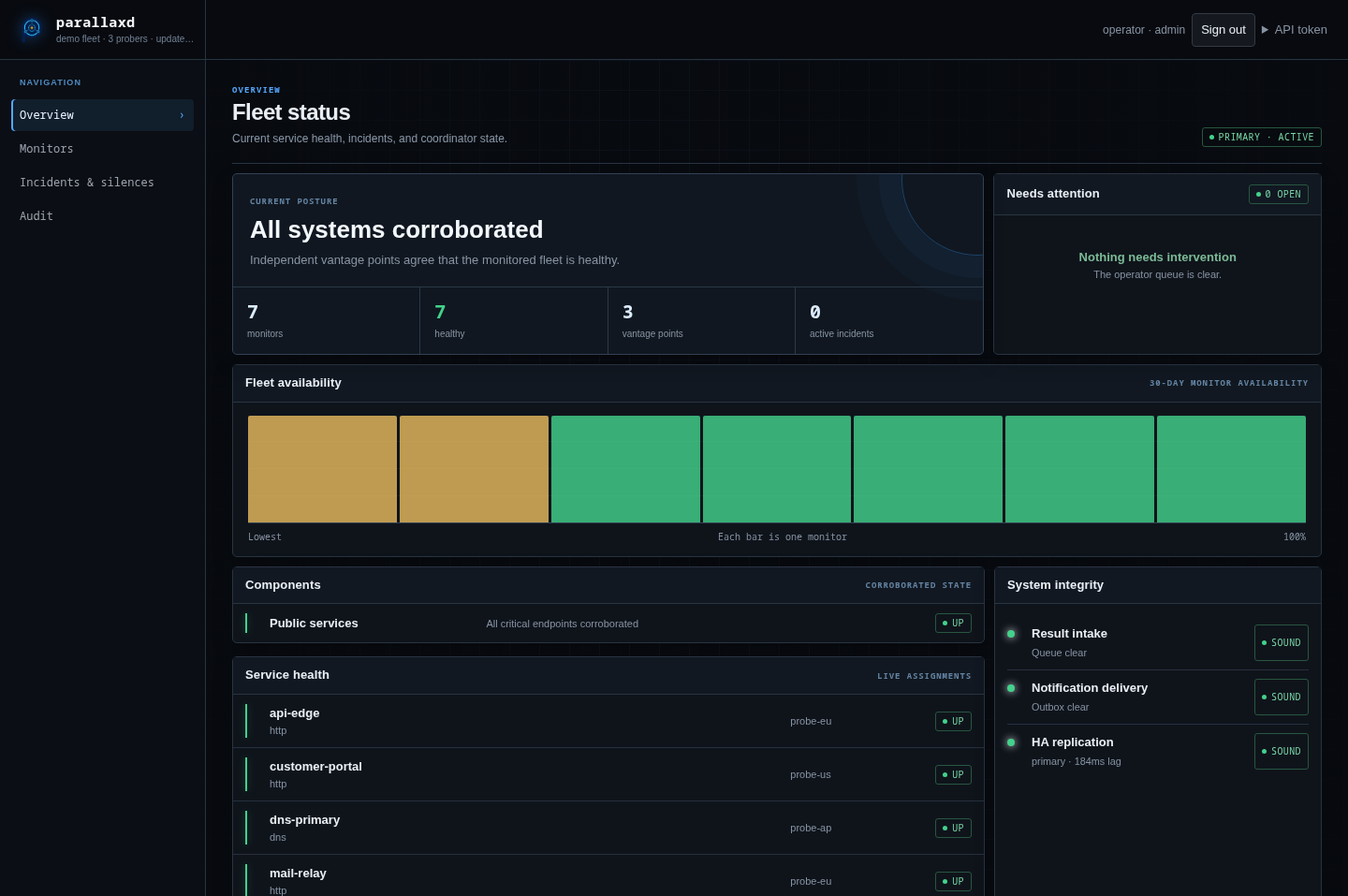
Status: operational. The coordinator, public and private probers, external watcher, warm standby, dashboard, and durable alert lifecycle are implemented. See the roadmap for current work.
How it works
One prober runs each check on its normal schedule. When it reports a failure, the coordinator asks other probers to test the same target immediately and applies a quorum rule to their signed results.
scheduled probe reports down
        │
        ▼
coordinator requests corroboration
        │
        ▼
quorum agrees ── yes ──► alert once on the transition
        │
        no
        ▼
remain inconclusive and retain the suspect timeline
This keeps steady-state traffic low while still checking failures from independent providers. It also supports richer checks—such as TLS, SMTP, DNS, gRPC, NTP, and authenticated HTTP—without running every check from every host all the time.
The design relies on a few rules:
- Results are
up,down, orunknown;unknownnever counts as a vote. - Every check declares a
publicorinternalvantage. - Each prober votes once, and optional provider diversity prevents several hosts at one provider from masquerading as independent evidence.
- A prober that cannot reach any of at least two peers is treated as isolated, and its target results are suppressed until it rejoins.
- Alerts fire on state transitions, not on every result. An inconclusive result does not clear an active outage.
- Requests and results are signed with Ed25519. The control plane should still use WireGuard or another encrypted transport because signatures do not provide confidentiality.
Components
| Binary | Role |
|---|---|
parallaxd |
Assigns checks, evaluates quorum, persists state, and sends alerts |
parallaxd-probe |
Runs scheduled and on-demand checks; makes no decisions |
parallaxd-watch |
Alerts when the coordinator's signed heartbeat stops |
parallaxd-ha |
Preflights and explicitly promotes a fenced warm standby |
parallaxd-network |
Creates and installs the WireGuard control overlay |
The coordinator also serves an operator dashboard, authenticated monitor and
incident APIs, a Streamable HTTP MCP endpoint at /mcp, a redacted public
status export, observation history, and HA diagnostics. Alert delivery supports
the always-on log, durable generic webhooks, and native Tintwire cards with a
generic-webhook fallback (for example, Mattermost) when Tintwire has a
retryable delivery failure.
Supported checks are tcp, http, banner, dns, tls, smtp, icmp,
request, grpc, and ntp. Related checks can be grouped into components so
operators receive one service-level alert instead of one alert per port.
Deployment
Try it on one machine
The Docker Compose demo brings up a coordinator, three probers, a watcher, and a controllable HTTP target on one machine:
Open http://127.0.0.1:8972 and follow the
demo exercise. The demo uses public, deliberately insecure
keys and credentials. Its provider labels are illustrative: containers on one
host are not independent failure domains, so Compose is for evaluation only
and must not be used as a production deployment.
A meaningful deployment needs one dedicated coordinator and at least three probers in distinct failure domains. The minimal topology below shares the watcher with one prober and omits the optional standby. Add HA only after this topology works; four probers then provide a spare.
Prerequisites
The Ansible controller needs Linux, Ansible, the Go version declared in
go.mod, ansible.posix, and SSH access with privilege escalation
to every target. Targets need a systemd-based Linux distribution with a
supported package manager. By default, the playbook installs and manages
firewalld. Ensure the hosts can reach each other at the addresses in the
inventory; TCP ports 8972–8974 carry the control traffic.
Ed25519 signs that traffic but does not encrypt it. Use private networking or another encrypted transport for production. The project-managed WireGuard overlay is configured when a standby is enabled and can also carry internal-prober traffic.
Minimal installation
Run these commands from the ansible directory:
git clone https://github.com/kilo666mj/parallaxd.git
cd parallaxd/ansible
ansible-galaxy collection install -r requirements.yml
cp inventory.example inventory
cp group_vars/all.yml.example group_vars/all.yml
# Edit inventory and replace the bootstrap password in group_vars/all.yml
# (one way to generate it is: openssl rand -base64 32).
ansible-inventory --graph
ansible all -m ping
ansible-playbook playbook.yml --syntax-check
ansible-playbook playbook.yml --check --diff
ansible-playbook playbook.yml
The example intentionally starts with no standby, no internal probers, no
custom CA, and no remote alert destination. Alerts are still recorded locally.
Before using the deployment in production, configure a watcher destination and
protect group_vars/all.yml with Ansible Vault or your normal secret manager.
Start with the documented variables in
ansible/group_vars/parallaxd.yml. The
playbook generates signing keys on their owning hosts, validates rendered
configuration, installs systemd services, configures the project WireGuard
overlay where needed, and applies source-restricted firewall rules.
The inventory has these groups:
parallaxd_coordinator: exactly one host, separate from the probers.parallaxd_probers: three or more independently hosted viewpoints.parallaxd_watch: the external dead-man's switch.parallaxd_standby: an optional coordinator in another failure domain.parallaxd_internal_probers: optional private probers on the managed WireGuard overlay.
Keep secrets out of committed configuration. The sanitized
all.yml.example names the expected
gitignored values. Private prober keys remain on their hosts; the standby is
the deliberate exception because it must retain the coordinator identity
trusted by the fleet.
Verify the installation
After the play completes:
ansible parallaxd_coordinator -b -m command \
  -a 'systemctl is-active parallaxd'
ansible parallaxd_probers -b -m command \
  -a 'systemctl is-active parallaxd-probe'
ansible parallaxd_watch -b -m command \
  -a 'systemctl is-active parallaxd-watch'
Open the dashboard through the SSH tunnel described below, sign in with the
bootstrap account, and confirm that all three probers have fresh evidence.
Then add the example monitor below and confirm it reports up before enabling
notifications or HA.
Add a monitor
Checks live in the coordinator catalogue and can be managed through the
dashboard/API after deployment. The initial catalogue comes from
parallaxd_checks:
parallaxd_checks:
  - name: website
    prober: probe-a
    kind: http
    target: https://example.com/health
    vantage: public
    interval: 1m
    timeout: 10s
    quorum:
      agree: 2
      of: 3
      distinct_providers: true
Use probers to restrict an internal monitor to a private pool. Internal
probers must also have an explicit parallaxd_allow_targets list. The prober
enforces target restrictions against resolved addresses, including permanent
blocks on link-local metadata ranges.
Validate configuration
Validate a rendered coordinator configuration without starting listeners, restoring state, or sending traffic:
The Ansible deployment performs the same preflight before atomically replacing the live configuration.
Use parallaxd -verify-backup /path/to/backup-root to exercise the real restore
path on disposable copies without starting the coordinator. See
automated operational assurance for
backup requirements and the separate checker/timer deployment.
Agent access with MCP
The coordinator's /mcp Streamable HTTP endpoint exposes typed tools for
status, incidents, diagnostics, history, monitor validation and testing, and
the versioned monitor catalogue. Tool calls pass through the existing
authenticated coordinator API, so authorization, validation, auditing,
persistence, and HA replication have one implementation.
Create a dedicated API token in the dashboard. Start agents with a viewer
token, use operator only when monitor changes are required, and reserve
admin for catalogue rollback. Never put the token in a URL or tracked
configuration.
Example Codex configuration:
[mcp_servers.parallaxd]
url = "https://status.example.com/mcp"
bearer_token_env_var = "PARALLAXD_MCP_TOKEN"
default_tools_approval_mode = "writes"
Expose /mcp only through the same trusted TLS and network boundary used for
the authenticated operator API. The endpoint does not weaken the coordinator's
existing source allowlist or transport requirements. See the complete
MCP setup, verification, troubleshooting, and rotation guide.
Operations
- Architecture and failure model
- Recurring operations
- Operational acceptance exercise and example record
- Coordinator failover drill and example record
- Security policy
- Contributing
The dashboard is served at the coordinator root. For a loopback-bound coordinator, access it through an SSH tunnel:
Then open http://127.0.0.1:8972/.
The optional host metrics integration adds a read-only Hosts view backed by existing Prometheus servers. It uses fixed, bounded node-exporter queries and keeps metric collection, storage, and alert rules in Prometheus; host measurements never affect parallaxd quorum verdicts.
Warm-standby promotion is intentionally manual: fence the old primary, inspect
replication health with parallaxd-ha, promote with an explicit fence
attestation, and move the service entry point. Loss of contact is never proof
that the old primary is fenced. Follow the failover drill rather than treating
the summary here as a runbook.
Development
Development requires the Go version declared in go.mod.
Tagged releases publish static Linux binaries for amd64 and arm64 with checksums.
Proxy routes
HTTP/HTTPS monitors support named HTTP(S) CONNECT and SOCKS5 proxy profiles.
Credentials stay on probers, target allow/deny rules remain enforced, and shared
proxy exits count as one independent quorum vote. Configure profiles and exit
identities before setting a monitor's proxy_profile; see
proxy probing for configuration and rollout details.
License
MIT