application
Rendercase
active
Self-hosted artifact publishing, review, versioning, and sharing for agents, CI, CLIs, and people.
Rendercase is a self-hosted place for AI agents, CI jobs, command-line tools, and people to publish and review interactive web artifacts. Each upload is an immutable HTML/CSS/JavaScript/WASM bundle that can be viewed in an isolated browser origin and shared with a revocable capability link.
What you get
- A browser UI authenticated with OpenID Connect (OIDC) or Cloudflare Access
- A Streamable HTTP MCP server for AI clients
- A REST API and command-line publisher
- Immutable, versioned ZIP bundles
- Filesystem or S3-compatible artifact storage
- Revocable and optionally expiring share links
- PostgreSQL-backed authorization and audit records
- Isolation between the management site and untrusted artifact content
Rendercase is intended to sit behind an HTTPS reverse proxy. It requires two hostnames and PostgreSQL. Browser authentication can use an OIDC login flow or a verified Cloudflare Access identity header. MCP clients continue to use OIDC OAuth bearer tokens. There is no hosted Rendercase service and artifact files stay on storage you control.
Place in the agent tooling stack
Rendercase owns immutable, reviewable web artifacts and their sharing policy. Use Wayminder for durable agent knowledge instead of storing memory records in artifact bundles. Use Switchboard when clients benefit from one identity-aware MCP endpoint that federates Rendercase with Wayminder and other services.
Those boundaries remain in force when Switchboard fronts Rendercase: Rendercase still validates uploads, owns artifact authorization and storage, and records the resolved Rendercase user. Switchboard may delegate an existing user only through the explicitly configured service identity described below.
The two URLs are a security boundary, not just a routing preference:
RENDERCASE_PUBLIC_URLis the trusted management origin. It serves login, the library UI, privileged REST/MCP endpoints, sharing controls, and audit- generating mutations. Cloudflare Access belongs in front of this hostname whencloudflare_accessbrowser authentication is enabled.RENDERCASE_CONTENT_URLis the untrusted artifact origin. It serves uploaded HTML, JavaScript, CSS, and WASM through short-lived signed tickets. It must be a different hostname so artifact code cannot inherit management cookies or become same-origin with privileged APIs. Do not put the management Access application in front of this hostname; the sandboxed viewer must be able to load its ticketed content directly.
Screenshots
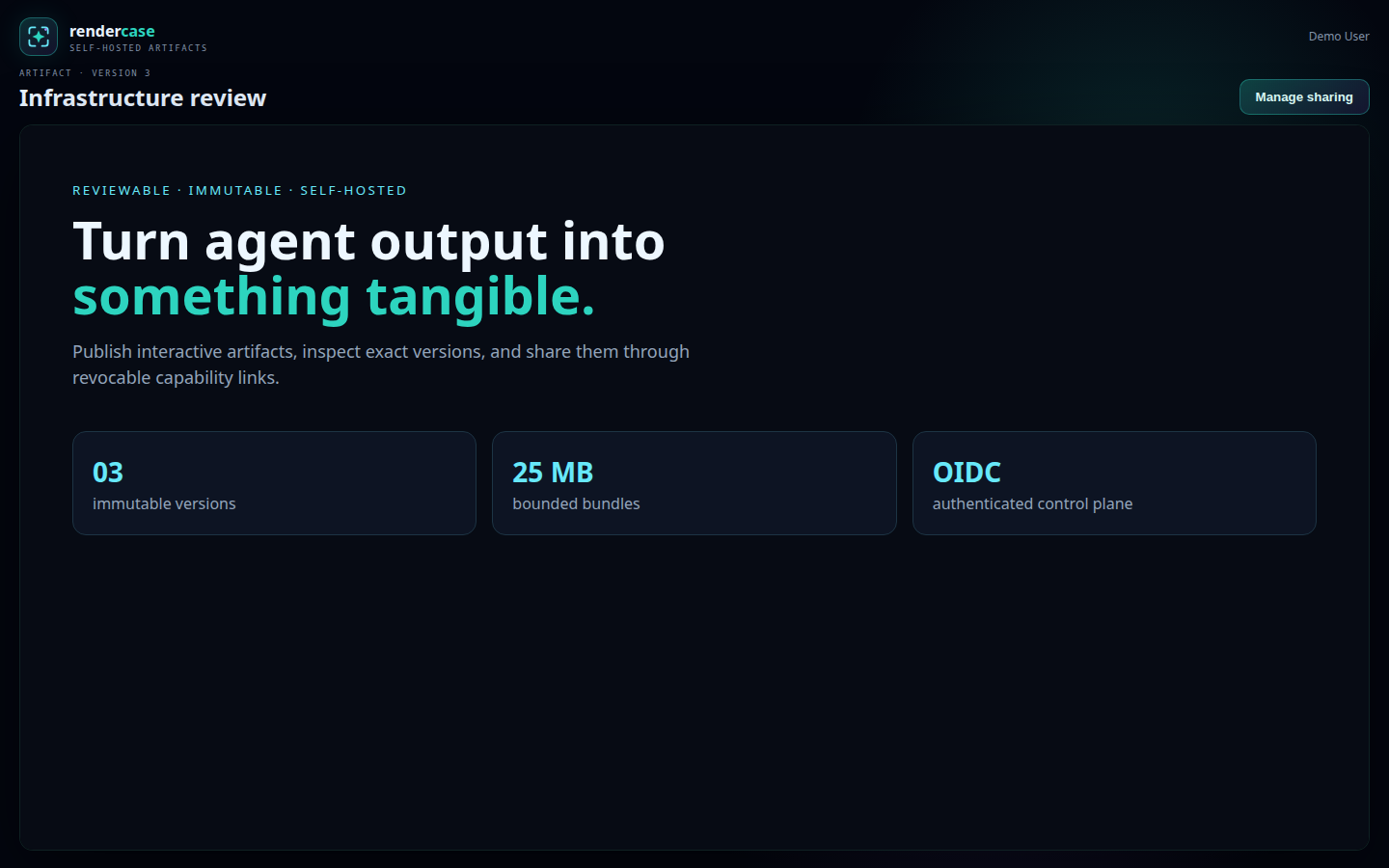
Artifact viewer
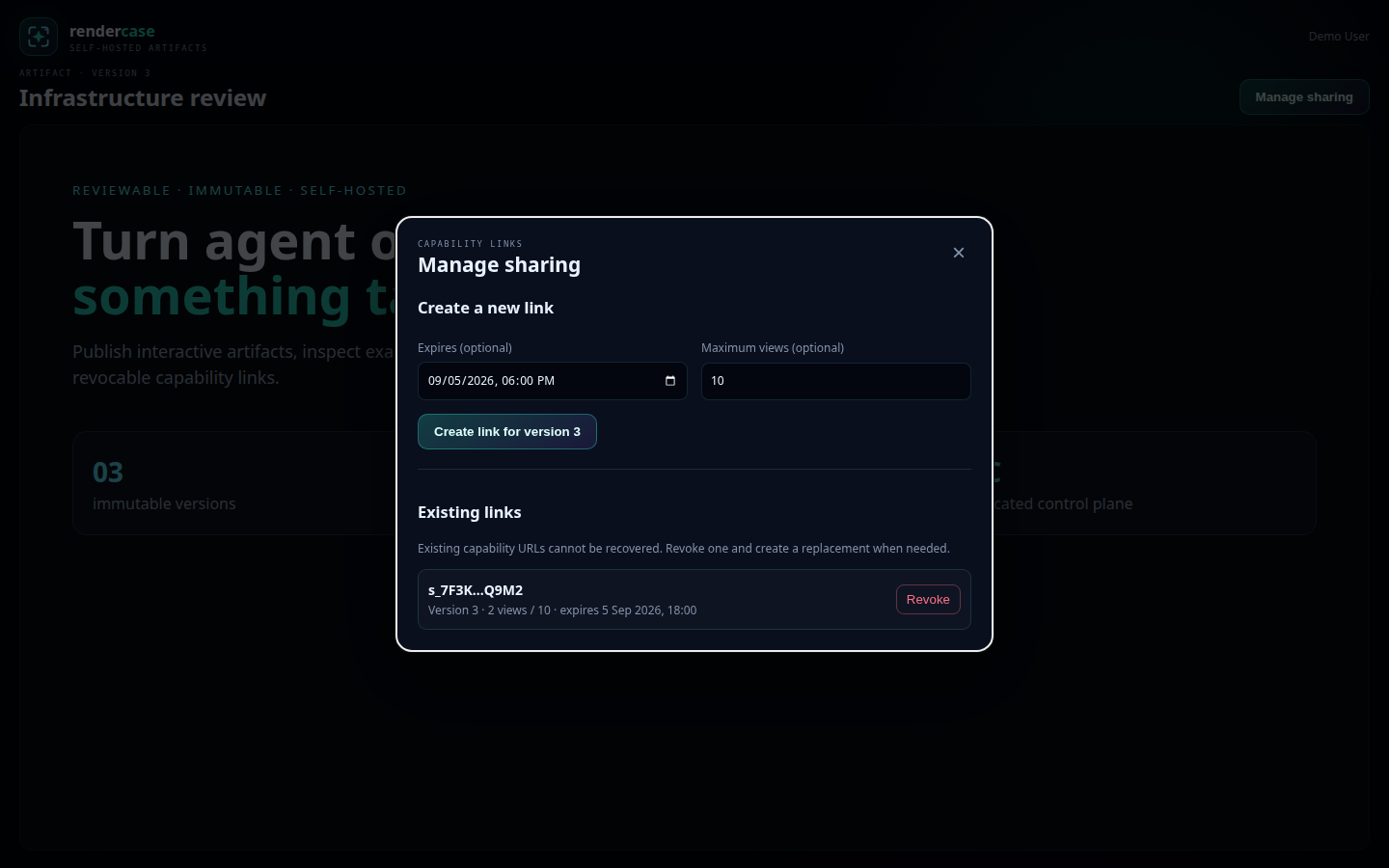
Sharing management
Quick start with Docker Compose
Prerequisites:
- Docker with Compose v2
- Two HTTPS hostnames, one for the UI and one for artifact content
-
An OIDC provider, plus either an OIDC browser client or Cloudflare Access
-
Clone the repository and create your configuration:
-
Put the generated value in
RENDERCASE_COOKIE_SECRETin.env, then fill in the URLs and OIDC settings. For the defaultoidcbrowser mode, register this callback with your provider:
RENDERCASE_ADMIN_SUBJECTS is a comma-separated list of identity sub
claims allowed to administer Rendercase. Administrators can list every
active artifact, revoke any capability share, and soft-delete an artifact
through /admin, the admin REST endpoints, or admin-only MCP tools. They do
not inherit owner/editor access and cannot publish versions for other users.
Deletion immediately hides the artifact and revokes its shares, while stored
files remain available to an operator for recovery.
To inherit browser identity from Cloudflare Access instead, set:
RENDERCASE_AUTH_MODE=cloudflare_access
RENDERCASE_CF_ACCESS_TEAM_DOMAIN=https://your-team.cloudflareaccess.com
RENDERCASE_CF_ACCESS_AUD=your-access-application-aud-tag
RENDERCASE_ADMIN_GROUPS=rendercase-admins
Protect only the management hostname with the matching Cloudflare Access
application. Rendercase verifies Cf-Access-Jwt-Assertion itself against
the team JWKS and requires the configured issuer and audience. Groups are
optional custom Access JWT claims. Keep RENDERCASE_OIDC_ISSUER and the MCP
OAuth settings configured so agents and CLI clients can complete OAuth with
Cloudflare Access. Clients send the resulting bearer token to Cloudflare,
which validates it at the edge, removes Authorization, and injects
Cf-Access-Jwt-Assertion for the origin. Rendercase verifies that assertion
with the configured Access issuer, JWKS, and audience, maps custom.groups
through RENDERCASE_ADMIN_GROUPS, and does not require an Authorization
header at the origin.
Access policy still runs before Rendercase. If capability share links should
remain usable without an account, configure more-specific Access bypasses
for /s/*, /shared/*, and /static/*. Keep /a/* protected: signed-in
artifact views require the Cloudflare assertion, while /shared/* accepts
only the share-session cookie established by /s/*. Large artifact
publishing also requires an exact /upload/* bypass: that path accepts only
PUT and Rendercase authenticates it with a high-entropy, short-lived upload
capability. Apply edge request-size and rate limits to it. Do not bypass
/api/v1/uploads/*; the nested commit endpoint requires an authenticated
user. Likewise, allow the OAuth or service-auth path used by your clients to
reach /mcp; Rendercase verifies the Access assertion Cloudflare injects
after authenticating that request.
Restrict direct origin access even though assertions are verified, because a
valid assertion remains a bearer credential until it expires.
- Start Rendercase and PostgreSQL:
Compose binds Rendercase to 127.0.0.1:18100; publish it through your HTTPS
reverse proxy. Route both configured hostnames to that port while preserving
the original Host header. Do not merge the management and content origins.
- Open your management URL and sign in. Readiness is available at
/readyzand returns HTTP 204 when the database and storage are usable.
For production, back up both Docker volumes, pin image versions, and configure proxy/firewall rules so port 18100 is not directly reachable by untrusted networks. Trust only the exact proxy addresses allowed to set forwarded IPs.
Documentation
- Operations and recovery — health checks, upgrades, backups, restores, and credential rotation
- Troubleshooting — startup, login, MCP, upload, and artifact-viewer failures
- MCP client integration — OAuth, Switchboard delegation, and the current tool inventory
- Security policy — vulnerability reporting
S3-compatible artifact storage
Filesystem storage is the default. To keep immutable artifact objects in AWS S3 or a compatible service, configure an existing bucket:
RENDERCASE_STORAGE_BACKEND=s3
RENDERCASE_S3_BUCKET=rendercase-artifacts
RENDERCASE_S3_PREFIX=production
RENDERCASE_S3_REGION=us-east-1
Rendercase uses the standard AWS credential chain. In Compose, credentials can
be supplied with AWS_ACCESS_KEY_ID, AWS_SECRET_ACCESS_KEY, and optionally
AWS_SESSION_TOKEN; AWS-hosted deployments can use their workload role. For a
compatible service, also set RENDERCASE_S3_ENDPOINT to its HTTPS origin and
enable RENDERCASE_S3_USE_PATH_STYLE when that service requires path-style
bucket URLs. Plain HTTP endpoints are accepted only on localhost for local
development.
On EKS, IRSA works without Rendercase-specific credentials. Annotate a
Kubernetes service account with the S3 IAM role and set
serviceAccountName on the Rendercase pod. The EKS admission webhook injects
AWS_ROLE_ARN and AWS_WEB_IDENTITY_TOKEN_FILE; the SDK exchanges that token
through STS using its default credential chain. Do not set static AWS access
keys in that pod.
apiVersion: v1
kind: ServiceAccount
metadata:
  name: rendercase
  annotations:
    eks.amazonaws.com/role-arn: arn:aws:iam::123456789012:role/rendercase-s3
---
apiVersion: apps/v1
kind: Deployment
spec:
  template:
    spec:
      serviceAccountName: rendercase
The bucket must already exist. The identity needs permission to inspect the bucket and to read and write objects below the configured prefix. Rendercase does not list or delete published objects during normal operation.
RENDERCASE_STORAGE_ROOT remains required in S3 mode as bounded local staging
space while ZIP uploads are validated and expanded. Keep its volume and allow
enough free space for concurrent uploads. Published artifact data is durable in
S3, so only PostgreSQL and the bucket require durable backup in this mode.
Switching backends does not migrate existing artifacts. Copy existing objects into Rendercase's key layout before changing a database to another backend, or start with a fresh database.
Publish an artifact
Build the CLI:
Create a ZIP whose entrypoint is index.html, obtain an OIDC access token with
the configured audience and rendercase:mcp scope, then run:
export RENDERCASE_URL=https://rendercase.example.com
export RENDERCASE_TOKEN=your-access-token
./rendercase-cli publish --title "My first artifact" --zip artifact.zip
If the management endpoint requires a client certificate, also set
RENDERCASE_CLIENT_CERT, RENDERCASE_CLIENT_KEY, and, when needed,
RENDERCASE_CA_FILE to PEM files.
The equivalent REST flow is:
POST /api/v1/artifacts/uploadswith a title and entrypoint.PUTthe ZIP to the returned/upload/{id}URL withX-Rendercase-Upload-Tokenor anAuthorization: Upload …header.POST /api/v1/uploads/{id}/commitwith the upload token.
Upload tokens are deliberately not accepted in query strings.
Artifact owners can keep an artifact private or set it to authenticated,
which makes it discoverable and viewable by every signed-in Rendercase account.
PUT /api/v1/artifacts/{artifact}/visibility changes that setting. Anonymous
access remains separate and is available only through revocable capability
links.
Administrators additionally have these endpoints:
GET /api/v1/admin/artifactslists all active artifacts, owners, and active capability shares.GETandPUT /api/v1/admin/brandingread, save, and activate named instance-wide themes containing the site name, messaging, color palette, optional logo, and optional separate favicon. The/adminpage provides the corresponding appearance editor and saved-theme selector. Brand images may be PNG, JPEG, or WebP and are limited to 512 KiB each; an instance may retain up to 50 themes. Without a separate favicon, the logo remains the fallback.DELETE /api/v1/admin/branding/themes/{theme}deletes an inactive saved theme. The active theme cannot be deleted.DELETE /api/v1/admin/shares/{share}revokes any capability share.DELETE /api/v1/admin/artifacts/{artifact}soft-deletes an artifact and revokes all of its shares. It does not erase stored object files.
Connect an MCP client
The MCP endpoint is /mcp. OAuth protected-resource metadata is published at
/.well-known/oauth-protected-resource/mcp. Configure your OIDC provider with
an API resource matching RENDERCASE_OAUTH_AUDIENCE and grant the
rendercase:mcp scope. For Pocket ID, scripts/configure-pocket-id-api can
create that resource when its documented environment variables are present.
When Switchboard authenticates users at a separate MCP resource, set
RENDERCASE_SWITCHBOARD_OAUTH_SUBJECT to the exact subject of Switchboard's
Rendercase-audience client-credentials token. Rendercase will then accept
X-Switchboard-OAuth-Subject only with that service token and resolve the
header to an existing Rendercase user. Unknown subjects fail closed, and other
bearers cannot delegate. Artifact ownership, sharing, and administrator access
continue to use the resolved Rendercase user. Restrict the upstream route to
the gateway network as an additional boundary.
Available MCP tools:
rendercase_listrendercase_getrendercase_get_brandingrendercase_publishrendercase_create_uploadrendercase_commit_uploadrendercase_set_visibilityrendercase_sharerendercase_revoke_sharerendercase_admin_list(administrators only)rendercase_admin_get_branding(administrators only)rendercase_admin_update_branding(administrators only)rendercase_admin_activate_branding_theme(administrators only)rendercase_admin_delete_branding_theme(administrators only)rendercase_admin_revoke_share(administrators only)rendercase_admin_delete_artifact(administrators only)
Install the artifact-authoring skill
The repository includes a Codex skill for creating responsive HTML artifacts, choosing suitable diagram and table forms, validating bundles for accidental secrets, and publishing directly through the Rendercase MCP.
Ask Codex:
Codex's skill installer places it under ~/.codex/skills/rendercase-artifact.
For a manual installation from an existing clone:
mkdir -p "${CODEX_HOME:-$HOME/.codex}/skills"
cp -R skills/rendercase-artifact "${CODEX_HOME:-$HOME/.codex}/skills/"
The skill becomes available on the next Codex turn. It does not configure the Rendercase MCP connection; connect the MCP endpoint above first.
MCP clients that cannot present a required TLS client certificate can use the included loopback-only bridge:
go build -o rendercase-mtls-proxy ./cmd/rendercase-mtls-proxy
RENDERCASE_URL=https://rendercase.example.com \
RENDERCASE_CLIENT_CERT=/secure/path/client.crt \
RENDERCASE_CLIENT_KEY=/secure/path/client.key \
./rendercase-mtls-proxy
Then point the MCP client to http://127.0.0.1:18101/mcp. The bridge never
injects or stores bearer tokens.
Configuration
Configuration is supplied through environment variables. Required variables are listed in .env.example. Optional controls include:
| Variable | Default | Purpose |
|---|---|---|
RENDERCASE_AUTH_MODE |
oidc |
Browser authentication: oidc or cloudflare_access |
RENDERCASE_LISTEN |
127.0.0.1:18100 |
HTTP listen address |
RENDERCASE_STORAGE_BACKEND |
filesystem |
Artifact backend: filesystem or s3 |
RENDERCASE_STORAGE_ROOT |
/var/lib/rendercase/artifacts |
Filesystem storage, or local staging in S3 mode |
RENDERCASE_S3_BUCKET |
— | Existing S3 bucket; required in S3 mode |
RENDERCASE_S3_PREFIX |
— | Optional object-key prefix |
RENDERCASE_S3_REGION |
us-east-1 |
S3 signing region |
RENDERCASE_S3_ENDPOINT |
— | Optional S3-compatible HTTPS endpoint |
RENDERCASE_S3_USE_PATH_STYLE |
false |
Use path-style S3 bucket URLs |
RENDERCASE_CF_ACCESS_TEAM_DOMAIN |
— | Cloudflare Access HTTPS team origin |
RENDERCASE_CF_ACCESS_AUD |
— | Exact Access application audience tag |
RENDERCASE_ADMIN_GROUPS |
— | Access groups granted administrator rights |
RENDERCASE_OAUTH_SCOPE |
rendercase:mcp |
Required MCP token scope |
RENDERCASE_SWITCHBOARD_OAUTH_SUBJECT |
— | Switchboard service-client subject allowed to delegate an existing user |
RENDERCASE_MAX_BUNDLE_BYTES |
26214400 |
ZIP and expanded bundle limit |
RENDERCASE_MAX_FILES |
500 |
Maximum files per bundle |
RENDERCASE_UPLOAD_TTL |
15m |
Upload session lifetime |
RENDERCASE_VIEWER_TICKET_TTL |
5m |
Content ticket lifetime |
RENDERCASE_SESSION_TTL |
12h |
Browser session lifetime |
RENDERCASE_MAINTENANCE_INTERVAL |
1h |
Cleanup interval |
RENDERCASE_AUDIT_RETENTION |
8760h |
Audit record retention |
Durations use Go syntax such as 30m, 12h, or 168h. See
internal/config/config.go for validation details.
Security model
- Management and artifact content use separate origins.
- Artifact iframes are sandboxed without
allow-same-origin; bundle responses receive a restrictive Content Security Policy. - ZIP ingestion rejects traversal, symlinks, duplicate paths, oversized expansion, excessive files, and missing entrypoints.
- Share, upload, browser-session, and OIDC-state secrets are high entropy and stored as hashes. Share URLs exchange their secret for a short-lived cookie.
- In Cloudflare Access mode, the application validates the assertion signature, issuer, audience, and lifetime against the team JWKS on every browser request; it never trusts an identity header without cryptographic verification.
- Existing artifact versions are immutable, and shares pin a version by default.
- Request sizes, titles, annotations, and upload expansion are bounded.
- Expired sessions, states, uploads, abandoned files, and old audit events are removed by periodic maintenance.
Your reverse proxy remains part of the security boundary. Terminate TLS there, add suitable rate limits, restrict direct origin access, and pass client addresses only from trusted proxies. See SECURITY.md for private vulnerability reporting.
Development
Rendercase requires Go 1.27.1 or newer:
go test ./...
go vet ./...
go build ./cmd/rendercase ./cmd/rendercase-cli ./cmd/rendercase-mtls-proxy
The application applies its PostgreSQL schema automatically at startup.
License
MIT — see LICENSE.
Service-account publishing
An agent authenticated as a service account owns its uploads independently of
browser users. To automatically grant a particular browser user private viewer
access, set RENDERCASE_PUBLISHER_VIEWERS to a JSON object of publisher identity
subjects mapped to recipient identity subjects:
Use exact users.oidc_subject values, not email addresses. Cloudflare Access
identities use the stored cloudflare_access: prefix. Each recipient must have
signed in at least once; an unknown recipient prevents startup, and a missing
recipient during publication rolls back the database commit. Publishers may be
configured before their first upload.
The grant is created in the same transaction as publication for API, CLI, and MCP uploads, including new versions. Startup also backfills all active artifacts owned by mapped publishers. Ownership and visibility remain unchanged, and existing grants (including editor grants) are preserved. Unmapped publishers retain the normal private defaults. Configure every replica consistently. Removing or changing a mapping stops future grants to the old recipient but does not revoke existing grants; revoke those separately when retiring access.